
Bulletin Board Entry Instructions
If you point your browser to http://slobytes.org/smf/index.php?board=1.0 to gain access to the new SLO Bytes Bulletin Board,
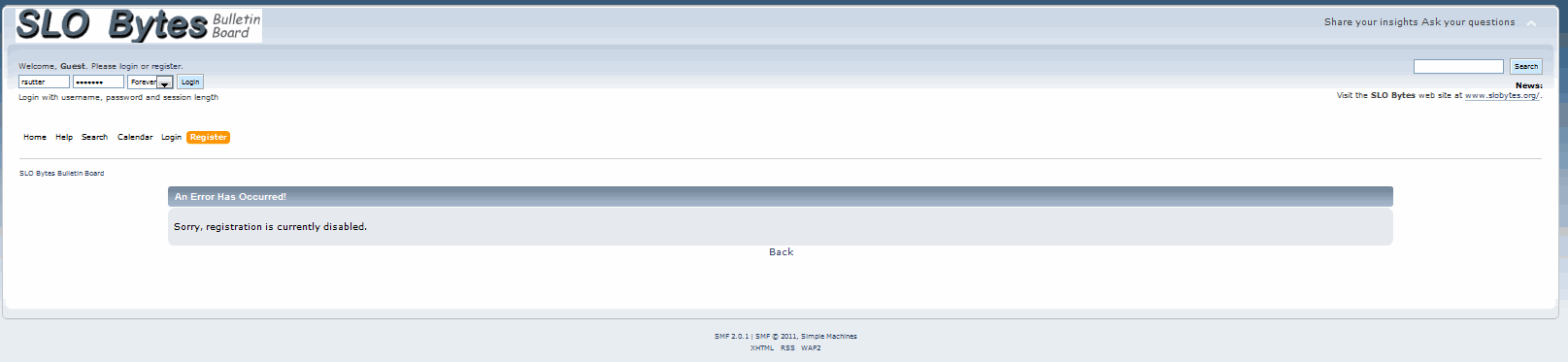
...you will see that self-registration has been disabled.
This step was taken to forestall registration by cyber miscreants whose interests bore nothing in common with the useful exchange of information via this bulletin board.
If you are a already a member of SLO Bytes and wish to be able to post to this bulletin board, e-mail your request to ralph@rsutter.com.
If you are not currently a member of SLO Bytes but would like to become one, you will find a registration form at www.slobytes.org/memberapplication.html
Requests to join are checked often and routinely approved for all current members of SLO Bytes. Upon approval, an approval notification will be e-mailed to the e-mail address that you provided in your request to register.
You do not have to register in order to view the SLO Bytes Bulletin Board, just to post messages or to reply to the posts of others.
Forgotten Password
If you are already registered with the SLO Bytes Bulletin Board but have forgotten your password, at the login screen, click on the link, Forgot your password?. Doing so will bring up the screen shown below
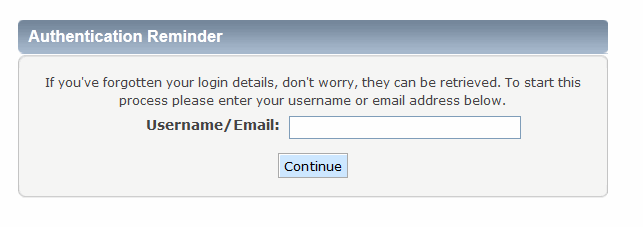
Provide the e-mail that you used when you registered with the bulletin board. Your new password will be e-mailed to that address. If you no longer have access to that e-mail address, contact ralph@rsutter.com for assistance.
Subscribers who post clearly offensive matter, commercial solicitation or spam are subject to having their posting privileges either suspended or revoked.
The only stupid question is the one that you don't ask - - That said, if you can search previous postings to see whether your question has been asked and answered already, you want to do so. Treat others on the bulletin board as busy friends. Try to figure out the answer yourself before asking, and then, when you can't figure it out yourself, do ask.
Be polite - - No one gets paid to monitor the bulletin board or to answer questions. They all have a day job or doing something else if they are retired. Those who answer do so because they enjoy it. If you respect that, and try to make it easy and enjoyable for people to answer you, then all the other tips here will seem obvious. You are dealing with your fellow SLO Bytes users. They don't work for Microsoft or any other computer company. Some of them have a great deal of expertise and you are getting it for FREE. Others may have little general expertise but may have experienced and solved the same problem that you are now facing. All suggestions are "as is" and without any warranties.
Be specific - - make the message subject line descriptive of the question. Saying something like: "Windows Problem" or "Help!!!" isn't going to catch the eye of somebody who might know the answer. Good Examples: "XP slowdown after installing MS Q811493 update" and "No Internet connection after installing Microsoft SP1" is much more informative and useful. However, even if that subject line says your entire question, repeat the question or problem in the body of your message.
If nobody answers your question, it is probably because nobody knows the answer. There is no guarantee that anyone will know the answer, though most questions should get answered. There is also no guarantee regarding response times. An answer will appear when somebody who knows the answer chances to read the question. Putting "URGENT" into a subject line is unlikely to make much difference as to when that will happen. Likewise, repeating the same question a few days later will just irritate people.
Don't post a new question in response to another person's post. Create a new post of your own. Avoid "me too" posts indicating you have the same problem unless you can add substantial information about it.
Briefly describe your machine as necessary - - Provide the CPU type and speed, amount of RAM, hard drive size and amount of free space. If you are having problems with a particular component, describe that hardware. Avoid listing every piece of unrelated hardware you own. Identify the operating system and version you are using: Control Panel >> System >> General Tab
Keep emotion and bad attitude out of your post - - Swearing at Microsoft or some software product or using foul language turns people off. Be professional as people who may be able to help you might not because of your demeanor.
Describe your problem - - as fully as possible, including where appropriate what you have tried so far when attempting to fix it. Where possible, use the terms used within the program itself to describe what is happening. Describe what you are trying to achieve overall. If you get an error message repeat the *exact* verbiage in the error message. Don't skimp on information but don't provide unrelated details and confuse the issue.
Identify - - the particular program version you're asking a question about.
Use your real name - - or at least something that looks like a real name. It seems somehow witless to start a reply by saying "Hi MadDog", or whatever your chosen alias is.
Use a spell checker - - If possible, type in a Word processor, then copy and paste into the bulletin board.
Post your responses - - to the bulletin board if you are answering a problem. Many people other than the person who asked the question will read your response and learn from it. Bulletin boards work well because everybody can see all the information.
Please, DO NOT e-mail questions directly to people you see on the bulletin board.
When you get help - - say "Thank you." Let the person know that you appreciated the answer and his or her solution worked and solved your problem.
Updated 11/09/2011
Please send your questions or comments about SLO Bytes to contact@slobytes.org.
Direct your comments regarding this site to ralph@rsutter.com


 Return to the SLO Bytes Main Page